Go Syntax and Types for Python Developers
You now have a working Go environment. The toolchain is installed, your editor is configured, and you've already pulled in an external dependency. From here, things get interesting—because Go's syntax and type system are where you'll feel the biggest difference from Python.
Here's the thing: Python is so good at hiding complexity that you never realize how many decisions it's making for you. Every time you write x = 5, Python silently figures out the type, allocates memory, and manages the object lifecycle. When you write x = "hello" two lines later, it just... lets you. No questions asked. Go is going to ask questions. A lot of them. But once you understand why, you'll realize they're actually good questions. The answers make your programs more predictable, and eventually, faster to build.
This section is about translating what you already know into Go's way of thinking. We're not starting from zero—we're learning a new dialect of something you already speak.
Types Attached to Variables, Not Values
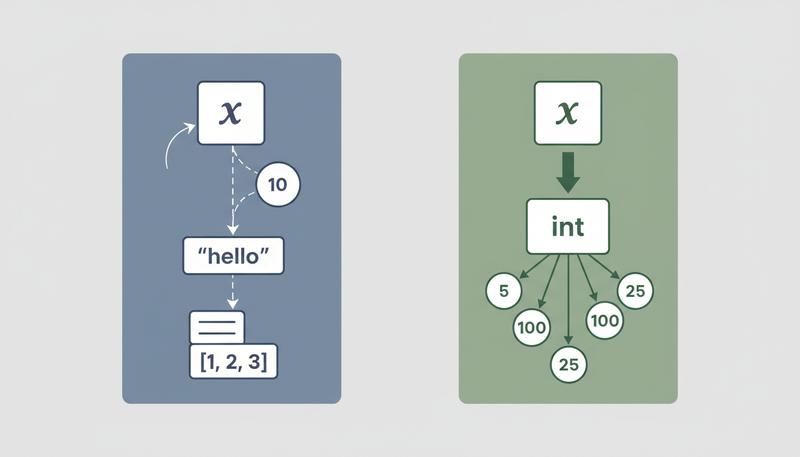
Here's the fundamental difference. In Python, types live on the values themselves:
x = 5       # the integer 5 carries its type with it
x = "hello" # x now points to a string — totally fine
In Go, types are attached to the variables:
var x int = 5
x = "hello"  // Compile error: cannot use "hello" (type string) as type int
Once you declare x as an int, it's always an int. The variable can't change what kind of thing it holds. This is what "statically typed" means: types are known and checked at compile time, not at runtime.
Why does this matter for web development? Imagine you're building a REST API and you get a JSON body. In Python, if you accidentally treat a number as a string, you might not find out until that code path gets hit in production when a user submits an unexpected request. In Go, the compiler catches type mismatches before your code ever runs. A runtime surprise becomes a compile-time fix.
This is the core trade-off we talked about in section 2. You lose the flexibility of Python's dynamic types. You gain something more valuable: confidence that your code, once compiled, has an entire class of errors already eliminated.
Declaring Variables: var vs. :=
Python has one way to create a variable: assignment. Go has two, and understanding when to use each is one of the first things that trips people up.
The var declaration is the long form. It works anywhere—inside functions and at the package level:
var name string = "Alice"   // fully explicit
var count int               // no initializer — gets the zero value (0)
var active bool = true
When you provide an initializer, you can let Go infer the type and drop the explicit type annotation:
var greeting = "Hello, Gopher"  // Go infers string
var port = 8080                 // Go infers int
The short variable declaration (:=) is the compact form you'll see everywhere inside functions:
name := "Alice"     // declares name as string and assigns "Alice"
count := 0          // declares count as int and assigns 0
active := true      // declares active as bool and assigns true
The := syntax does two things at once: it declares the variable and initializes it, with the type inferred from the right-hand side. It's roughly equivalent to var name = "Alice" but shorter.
Here's the critical rule: := only works inside functions. You cannot use it at the package level. This is a hard constraint, not a style preference:
package main

greeting := "Hello"  // Compile error: syntax error outside function body

var serverName = "api-server"  // Fine — var works at package level

func main() {
    port := 8080        // Fine — := works inside a function
    fmt.Println(port)
}
So why does Go have both? Each has its place:
- Use
:=when you're declaring and initializing a variable inside a function. It's concise and idiomatic—most local variable declarations in Go look like this. - Use
varwhen you want a zero value without an initializer (var count intstarts at 0), when you're declaring at the package level, or when you want to be explicit about the type for clarity.
In practice, you'll write := ninety percent of the time inside functions, and reach for var when you specifically need a zero-valued variable or when you're working at the top of a file:
func handleRequest(path string) {
    // := for most local variables
    start := time.Now()
    result := processPath(path)

    // var when you want the zero value explicitly
    var errorCount int  // starts at 0, will be incremented conditionally

    // ... rest of the function
}
Quick rule: Inside a function? Use
:=. Want a zero value or working at the package level? Usevar. When in doubt, the compiler will tell you which one is wrong.
Go's Basic Types
Python has one integer type (int), one float type (float), a bool, and str. Go is more granular. This matters when you're thinking about performance and memory—especially when you're building web services that might handle millions of requests.
Integers:
var a int     // platform-dependent: 32 or 64 bits
var b int8    // -128 to 127
var c int16   // -32,768 to 32,767
var d int32   // -2,147,483,648 to 2,147,483,647
var e int64   // -9,223,372,036,854,775,808 to 9,223,372,036,854,775,807
var f uint    // unsigned: 0 to max
var g uint64  // unsigned 64-bit
In practice, you'll use int most of the time. It's the default, it's what Go uses for slice indices and most everyday arithmetic, and unless you're writing serialization code or optimizing memory layout in structs, you don't need to think about the sized variants. But they exist when you need them—working with binary protocols, parsing network packets, or fitting things tightly into memory. That's when int32 or uint8 becomes your friend.
Floats:
var price float64 = 9.99
var temperature float32 = 98.6
float64 is Go's default floating point type, and it's what you'll almost always want. float32 saves memory but loses precision—mostly relevant in graphics or embedded contexts. For web APIs dealing with money or measurements, stick with float64.
Booleans:
var active bool = true
var deleted bool = false
No surprises. Booleans are true and false (lowercase), not True and False like Python.
Strings:
greeting := "Hello, Gopher"
Go strings are immutable byte sequences encoded as UTF-8. Conceptually similar to Python 3 strings. You can index into them, but you get bytes, not characters. For character-level operations on non-ASCII text, you want rune—Go's equivalent of a Unicode code point, essentially an int32.
Zero Values: Go's Answer to None
In Python, uninitialized state is often represented by None, which you have to check explicitly or risk an AttributeError at runtime.
Go takes a completely different approach: every type has a zero value—a sensible default that's applied automatically when you declare a variable without initializing it.
var name string    // zero value: ""
var count int      // zero value: 0
var ratio float64  // zero value: 0.0
var active bool    // zero value: false
Here's what that looks like across the basic types:
graph LR
    A[Zero Values] --> B[string → empty string]
    A --> C[int → 0]
    A --> D[float64 → 0.0]
    A --> E[bool → false]
    A --> F[pointer → nil]
    A --> G[slice → nil]
    A --> H[map → nil]
Why is this better than None? Because you can always use a zero-valued variable safely. An empty string is a valid string—you can call len() on it, concatenate it, pass it to a function. A zero integer is a valid integer. You never need a null check before using a primitive type.
Remember: Zero values aren't just a convenience—they're a deliberate design choice. In Go, "uninitialized" and "zero" are the same thing for value types. This eliminates a whole category of null-pointer bugs that plague other languages.
This is also why var count int is idiomatic Go when you want a counter that starts at zero. You're not being lazy about initialization—you're explicitly relying on a language guarantee.
For pointer types, maps, and slices (coming up in the next section), the zero value is nil, and you do need to be careful there. But for the basic types above, zero values just work.
Constants: No Sneaking Around
Python constants are a social contract. The convention is SCREAMING_SNAKE_CASE, and the ecosystem respects it, but nothing stops someone from writing:
MAX_CONNECTIONS = 100
MAX_CONNECTIONS = 200  # Python shrugs and lets this happen
Go const declarations are enforced by the compiler:
const MaxConnections = 100
MaxConnections = 200  // Compile error: cannot assign to MaxConnections
You can declare multiple constants together using a block:
const (
    StatusOK       = 200
    StatusNotFound = 404
    StatusError    = 500
)
Go also has iota, which is genuinely useful for defining enumerations. It's something Python doesn't have a clean equivalent for:
const (
    RoleGuest = iota  // 0
    RoleUser          // 1
    RoleAdmin         // 2
)
iota increments automatically for each constant in the block. You'll see this pattern constantly in Go web code—defining HTTP status codes, user roles, configuration flags. It's a small feature that eliminates a lot of repetitive typing.
Constants in Go can be typed or untyped, and untyped constants have higher precision than regular variables. Think of them as mathematical ideals that get a concrete type when they're used in an expression. This is a nuance you don't need to memorize right now, but it explains why const pi = 3.14159 just works in arithmetic expressions of different float types without explicit conversion.
Control Flow: Familiar Territory, Different Syntax
If/Else
Go's if should feel immediately recognizable, with two differences: no parentheses around the condition, and curly braces are mandatory.
# Python
score = 85
if score >= 90:
    print("A grade")
elif score >= 80:
    print("B grade")
else:
    print("Lower grade")
// Go
score := 85
if score >= 90 {
    fmt.Println("A grade")
} else if score >= 80 {
    fmt.Println("B grade")
} else {
    fmt.Println("Lower grade")
}
Python uses elif, Go uses else if. The brace placement is rigid—Go's formatter (gofmt) will enforce it. The opening brace must be on the same line as the if. Try to put it on the next line and the compiler complains. This is worth embracing early. gofmt is one of Go's best quality-of-life decisions. You never argue about style again.
Go's if has one more trick that Python lacks: an initialization statement. You can run a short statement before the condition, and the variable it declares is scoped to just that if block:
if err := doSomething(); err != nil {
    fmt.Println("Error:", err)
}
// err is not accessible here — it's gone
You'll see this pattern constantly in Go code for error handling. It keeps error variables from leaking into broader scope and is genuinely idiomatic.
The for Loop: Go's Only Loop
Python has for, while, and while True. Go has... for. Just for. It does everything.
Classic C-style loop (the Python for i in range(n) equivalent):
for i := 0; i < 5; i++ {
    fmt.Println(i)
}
Condition-only loop (Python's while):
sum := 1
for sum < 100 {
    sum *= 2
}
Infinite loop (Python's while True):
for {
    // runs forever until break or return
}
Range loop (Python's for x in collection):
fruits := []string{"apple", "banana", "cherry"}
for index, fruit := range fruits {
    fmt.Println(index, fruit)
}
This works like Python's enumerate()—you get both the index and the value. If you only want the value, discard the index with _:
for _, fruit := range fruits {
    fmt.Println(fruit)
}
The range keyword works on slices, maps, strings, and channels—pretty much everything you'd want to iterate over. For maps, it gives you key-value pairs. For strings, it gives you the index and the rune (Unicode code point).
Tip: If you're reaching for a while loop from Python habit, just write
forwith a condition. If you need awhile True, writefor {}. You'll get comfortable with it quickly.
Switch Statements
Python doesn't have a switch statement in the traditional sense (though match was added in Python 3.10). Go's switch is genuinely useful and more powerful than most:
day := "Monday"
switch day {
case "Monday", "Tuesday", "Wednesday", "Thursday", "Friday":
    fmt.Println("Weekday")
case "Saturday", "Sunday":
    fmt.Println("Weekend")
default:
    fmt.Println("Unknown")
}
Key difference from C-style switches: no break needed. Go cases don't fall through by default. If you actually want fall-through behavior, you use fallthrough explicitly. This is almost always the right default.
You can also do a switch with no condition, which is a clean way to replace long if-else if chains:
score := 85
switch {
case score >= 90:
    fmt.Println("A grade")
case score >= 80:
    fmt.Println("B grade")
default:
    fmt.Println("Lower grade")
}
Boolean Logic and Short-Circuit Evaluation
This one's a clean parallel to Python. Go uses && and || instead of and and or, and ! instead of not:
// Python: if is_active and not is_deleted:
if isActive && !isDeleted {
    // ...
}

// Python: if x > 0 or y > 0:
if x > 0 || y > 0 {
    // ...
}
Short-circuit evaluation works exactly as you'd expect: && stops evaluating if the left side is false; || stops evaluating if the left side is true. The behavior is identical to Python.
One thing Python lets you do that Go doesn't: truthiness. In Python, you can write if username: and it evaluates the string as a boolean. In Go, conditions must be explicitly boolean. if username is a compile error if username is a string—you need if username != "".
This is occasionally annoying but prevents a class of subtle bugs where non-zero values get treated as truthy when you didn't intend them to be.
String Formatting: fmt.Sprintf vs. f-strings
Python's f-strings are genuinely excellent:
name = "World"
greeting = f"Hello, {name}!"
Go's equivalent is fmt.Sprintf:
name := "World"
greeting := fmt.Sprintf("Hello, %s!", name)
The format verbs you'll use most often:
| Verb | Meaning | Python equivalent |
|---|---|---|
%s |
String | str(x) in format |
%d |
Integer | %d or f"{x}" |
%f |
Float | %f or f"{x:.2f}" |
%v |
Default format (works for anything) | str(x) |
%+v |
Struct with field names | repr(x) roughly |
%T |
Type of the value | type(x).__name__ |
%t |
Boolean | n/a |
%v is your go-to for debugging. It works on almost anything and prints something sensible. %+v on a struct prints field names alongside values, which is invaluable when you're debugging HTTP request parsing.
For printing to the console without building a string, use fmt.Println for a newline or fmt.Printf for formatted output:
user := "Alice"
requestCount := 42
fmt.Printf("User %s made %d requests\n", user, requestCount)
Go doesn't have the expression power of Python's f-strings (like f"{2 + 2}"). You compute first, then format. It's a minor inconvenience you'll adapt to quickly.
Explicit Type Conversion: No Magic Here
This is where Python's convenience becomes Go's discipline.
In Python:
x = 5
y = 2.0
result = x + y  # Python silently converts x to float: 7.0
In Go:
x := 5
y := 2.0
result := x + y  // Compile error: mismatched types int and float64
Go will never silently convert between types. Ever. You do it explicitly:
x := 5
y := 2.0
result := float64(x) + y  // 7.0 — now it works
The conversion syntax is TypeName(value). It looks like a function call but it's actually a type conversion expression:
var i int = 42
var f float64 = float64(i)
var u uint = uint(f)
var s string = strconv.Itoa(i)  // int to string: needs strconv package
There's a gotcha here. string(42) doesn't give you "42"—it gives you the string with Unicode code point 42 (which is "*"). To convert an integer to its string representation, you use strconv.Itoa() or fmt.Sprintf("%d", i).
Warning:
string(someInt)does NOT produce the integer as a string. It produces the character at that Unicode code point. Always usestrconv.Itoa()orfmt.Sprintf("%d", n)when you want the number rendered as text.
The explicit conversion requirement feels tedious at first. But think about how many Python bugs you've encountered where a value was unexpectedly a string when code assumed it was an int, or vice versa. Explicit conversion means you can always read the code and know exactly what type you're working with at every step.
Putting It Together: A Small Program
Here's everything from this section working together in realistic code—something that could actually live in a web application:
package main

import (
    "fmt"
    "strconv"
)

const MaxRequestSize = 1024 * 1024 // 1MB in bytes

func describeRequest(path string, sizeBytes int, isAuthenticated bool) string {
    sizeKB := float64(sizeBytes) / 1024.0

    var accessLevel string  // zero value "" — will be set below
    if isAuthenticated {
        accessLevel = "authenticated"
    } else {
        accessLevel = "anonymous"
    }

    status := "ok"
    if sizeBytes > MaxRequestSize {
        status = "too large"
    }

    return fmt.Sprintf(
        "Request to %s from %s user: %.2f KB (%s)",
        path, accessLevel, sizeKB, status,
    )
}

func main() {
    result := describeRequest("/api/users", 512000, true)
    fmt.Println(result)

    // Type conversions
    portStr := "8080"
    port, _ := strconv.Atoi(portStr)  // string to int (we'll cover error handling later)
    fmt.Println("Listening on port:", port)
}
Notice the variable declarations at work here: := for everything being declared and initialized inside functions (sizeKB, status, result, portStr, port), and var accessLevel string when we want the zero value because we know we'll assign it in the if/else block below. Both patterns are intentional, not interchangeable.
This is real Go: explicit types, fmt.Sprintf for formatting, explicit float64() conversion, zero values doing quiet work, and constants for meaningful configuration values.
By the end of this section, the syntax should feel legible. You'll notice the consistent brace style, the := declarations, the explicit types everywhere. None of it is arbitrary—Go is optimized for readability across teams and time, not brevity in the moment. The next section takes these foundations and applies them to Go's collection types, where the real differences from Python start to get genuinely interesting.
Only visible to you
Sign in to take notes.