Database Tables Rows Columns and Keys Explained
Now that you understand when to reach for a database instead of Excel, let's talk about what you're actually reaching for. Because understanding the difference between the two tools isn't just about choosing wisely — it's also about recognizing that databases use the same fundamental building blocks you already know from spreadsheets: rows, columns, filtering, combining data. The difference is in the structure and enforcement underneath.
To make this concrete, let's meet Mario. Mario runs a pizza restaurant called Mario's Magnificent Pies, and business is booming. He's got loyal regulars, a menu that changes seasonally, and an order volume that's outgrown the sticky-note system he used in his first year. A year ago, Mario might've thrown everything into an Excel file and called it a day. Today, he needs a database — not because spreadsheets are evil, but because his data has relationships that Excel makes fragile, and his staff needs to access the same information simultaneously without stepping on each other's toes. Mario's story is going to follow us through this entire course — so get comfortable, because every concept from here on out will be built on the foundation of his restaurant.
But before Mario can query a database, he needs to understand what a database actually is, structurally. And that means understanding four things: tables, rows, columns, and keys. These are the DNA of every relational database ever built. Get these right and everything else — joins, queries, performance tuning — will click naturally into place. Get them fuzzy and you'll write queries that "work" but produce answers that are quietly wrong. Let's start building.
The Single-Entity Principle: One Table, One Thing
Here's the rule that separates well-designed databases from ones that will eventually make a developer cry: every table should describe exactly one entity.
An entity is a "thing" — a customer, a product, an order, an employee, a location. If you have a table where each row sometimes represents a customer and sometimes represents an order, you've already created a mess. And it's not a hypothetical mess — Microsoft's own database normalization guide identifies this kind of inconsistency as one of the root causes of data maintenance problems.
In Mario's world, this means:
- The
customerstable only stores information about customers - The
pizzastable only stores information about pizzas - The
orderstable only stores information about orders
It does not mean cramming customer name, pizza name, and order date into a single massive table, even though that feels simpler at first. We'll see why in just a moment, when we get to keys.
Rows: One Record, One Thing
Within a table, every row (also called a record or a tuple in the more academic literature) represents one instance of the entity that table describes.
In Mario's customers table:
- Row 1 = one customer
- Row 2 = a different customer
- Row 47 = yet another customer
That's it. Each row is one customer, and every column in that row describes something about that specific customer.
Here's what Mario's customers table might look like:
| customer_id | first_name | last_name | phone | |
|---|---|---|---|---|
| 1 | Sofia | Reyes | [email protected] | 555-0142 |
| 2 | Ben | Okafor | [email protected] | 555-0287 |
| 3 | Priya | Nair | [email protected] | 555-0391 |
Three rows, three customers. Clean. You'll notice something interesting in that first column — customer_id — and we'll get to that shortly. It's doing important work.
Columns: The Attributes of Each Record
If rows are the instances, columns are the attributes — the characteristics that describe each instance.
In the customers table, the columns are things like first_name, last_name, email, and phone. Every customer has all of these attributes (or at least can have them). The columns are the same for every row — that's what gives the table its consistent structure.
In Mario's pizzas table:
| pizza_id | name | size | price | is_available |
|---|---|---|---|---|
| 1 | Margherita Classic | Medium | 12.99 | true |
| 2 | Truffle Arugula | Large | 18.99 | true |
| 3 | Four Cheese | Small | 9.99 | false |
Each pizza has an ID, a name, a size, a price, and a flag indicating whether it's currently on the menu. The Four Cheese pizza is apparently out of commission — Mario's supplier is having issues. We'll give him time.
Notice that column names are specific, unambiguous, and lowercase with underscores (a convention so universal that violating it marks you as a beginner immediately). first_name beats vague names like "Name". order_date is clearer than "Date". is_available tells you exactly what the column means, whereas "Status" leaves you guessing.
Data Types: Why the Database Cares What Kind of Data You Store
Here's where a lot of newcomers get annoyed, and I want to talk you out of that annoyance before it sets in.
When you create a column in a database, you don't just give it a name — you tell the database what type of data it will hold. The most common types you'll encounter are:
| Data Type | What It Holds | Example |
|---|---|---|
INT (or INTEGER) |
Whole numbers, no decimals | 42, 1000, -7 |
VARCHAR(n) |
Text up to n characters long | 'Mario', '[email protected]' |
TEXT |
Long-form text, no fixed limit | A paragraph of notes |
DECIMAL(p, s) |
Precise numbers with decimals | 12.99, 0.05 |
DATE |
A calendar date | 2024-03-15 |
BOOLEAN |
True or false | true, false |
PostgreSQL's official documentation covers the full range of types available, and DigitalOcean's comparison guide for relational databases notes that different database systems implement types slightly differently — but these core types are consistent everywhere.
So why does this matter? Let's say Mario stores pizza prices in a column typed as VARCHAR (text) instead of DECIMAL. Everything looks fine — the price "12.99" is visible in the table. But the moment Mario tries to write a query that adds up total revenue from all orders, the database is doing math on text strings. Different databases will handle this differently — some will throw an error, some will silently produce garbage results. Either way: bad day for Mario.
graph TD
    A[New Data Arrives] --> B{Does it match column type?}
    B -->|Yes| C[Data stored successfully]
    B -->|No| D[Database rejects the entry]
    D --> E[Error message returned]
    E --> F[Data problem caught immediately]
    C --> G[Query can safely use typed data]
Data types also let the database be smarter about storage and indexing. An INT column takes exactly 4 bytes per value. The database knows this, and it can organize and search integer data much faster than text data. Specifying types isn't bureaucratic overhead — it's information you give the database so it can do its job well.
Remember: Data type violations are caught at write time, not query time. This is a feature. It means you never have to wonder if bad data snuck into your table — the database refused it at the door.
Here's a practical example. If someone tries to add a row to Mario's orders table with order_date = 'last Tuesday', the database will return an error immediately. last Tuesday is not a valid DATE value. In Excel, that cell would've happily accepted "last Tuesday" and you'd only discover the problem three months later when a report breaks.
Warning: Using
VARCHARorTEXTfor everything because it's easier is one of the most common beginner mistakes. You lose data validation, query performance, and the ability to do meaningful comparisons. Resist the temptation.
Primary Keys: The ID Badge Every Row Needs
Here's a scenario: Mario's customers table has 500 customers. Two of them are named "John Smith." Three of them have the same phone number (a family plan). One person signed up twice with different email addresses.
Without some way to uniquely identify each customer, you're in trouble. Which John Smith ordered the large truffle pizza? The database doesn't know. You don't know. Mario definitely doesn't know.
This is the problem that primary keys solve.
A primary key is a column (or sometimes a combination of columns) whose value uniquely identifies every row in the table. No two rows can have the same primary key value. No row can have a missing (NULL) primary key value. As DigitalOcean explains, a PRIMARY KEY constraint is essentially the combination of two simpler constraints: UNIQUE (no duplicates) and NOT NULL (can't be empty). Together, they guarantee that every row can always be found unambiguously.
The most common — and, honestly, most elegant — approach to primary keys is the auto-incrementing integer. Every time you insert a new row, the database automatically assigns the next available number. Row 1 gets customer_id = 1. Row 2 gets customer_id = 2. Row 500 gets customer_id = 500. You never think about it. The database handles it.
This bores some people. It shouldn't. Boring primary keys are a virtue.
Why You Shouldn't Use Names, Emails, or SSNs as Primary Keys
Every few months, someone designs a database where email addresses are the primary key, because "well, emails are unique, right?" Let me enumerate the ways this goes wrong:
Emails change. People switch providers. They get married and change their last name. If Mario's database uses email as the primary key for customers, and a customer changes their email, that change needs to cascade through every other table that references that customer. This is an enormous headache that an auto-increment integer key would have completely avoided.
"Unique" is surprisingly not unique. Names obviously repeat. Phone numbers are shared (family plans, businesses). Even social security numbers — the classic "surely this is unique" example — have had documented cases of being incorrectly reused or shared. An SSN is also deeply sensitive data that you never want stored more places than absolutely necessary.
Natural IDs encode assumptions. If you use a product SKU or an employee badge number as a primary key, you're assuming that numbering scheme will never change. Organizations rename things. Companies merge. Systems get replaced. A synthetic auto-increment key has no meaning attached to it, which means it has no assumptions to violate.
Performance matters. Integers compare faster than strings. This becomes critical when you have millions of rows and are joining tables together. An integer-based lookup is blazing fast. A string comparison is slower, and the performance difference compounds as your data grows.
Tip: When in doubt, use an auto-incrementing integer called
[tablename]_idas your primary key.customer_id,pizza_id,order_id. This convention is so universal that anyone reading your schema will immediately understand the structure.
Building Mario's Database: Three Tables
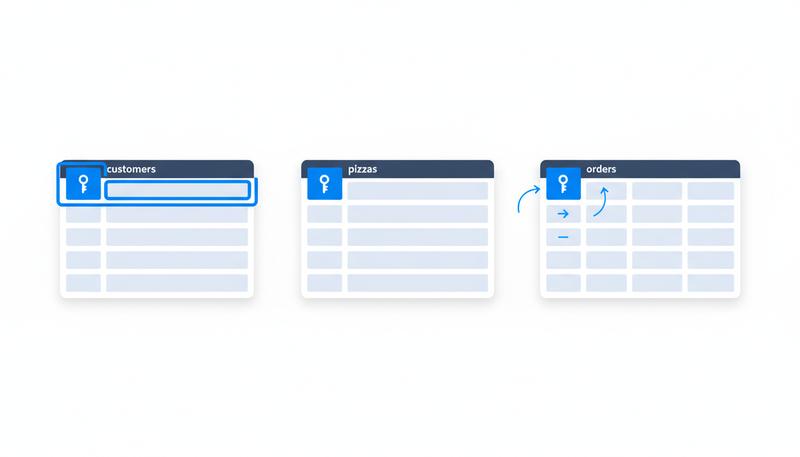
Let's put all of this together and actually design the starting structure for Mario's Magnificent Pies. We have three core entities — customers, pizzas, and orders — and each gets its own table.
graph LR
    C[customers table<br/>customer_id PK<br/>first_name<br/>last_name<br/>email<br/>phone]
    P[pizzas table<br/>pizza_id PK<br/>name<br/>size<br/>price<br/>is_available]
    O[orders table<br/>order_id PK<br/>customer_id FK<br/>pizza_id FK<br/>quantity<br/>order_date]
    C --> O
    P --> O
The customers table:
customers
---------
customer_id    INTEGER     (Primary Key, auto-increment)
first_name     VARCHAR(50)
last_name      VARCHAR(50)
email          VARCHAR(100)
phone          VARCHAR(20)
The pizzas table:
pizzas
------
pizza_id       INTEGER     (Primary Key, auto-increment)
name           VARCHAR(100)
size           VARCHAR(20)
price          DECIMAL(6,2)
is_available   BOOLEAN
The orders table:
orders
------
order_id       INTEGER     (Primary Key, auto-increment)
customer_id    INTEGER     (references customers.customer_id)
pizza_id       INTEGER     (references pizzas.pizza_id)
quantity       INTEGER
order_date     DATE
Did you notice something in that orders table? Two of the columns — customer_id and pizza_id — don't contain customer names or pizza names. They contain numbers. Specifically, they contain numbers that correspond to primary keys in the other two tables.
This is the first glimpse of relational magic, and it deserves a moment.
The First Glimpse of Relational Thinking
Here's what the orders table might look like with some data:
| order_id | customer_id | pizza_id | quantity | order_date |
|---|---|---|---|---|
| 1 | 1 | 2 | 2 | 2024-03-15 |
| 2 | 3 | 1 | 1 | 2024-03-15 |
| 3 | 1 | 1 | 3 | 2024-03-16 |
At first glance, this looks like a bunch of numbers. Not very readable. But watch what it doesn't contain: it doesn't repeat Sofia's full name, email address, and phone number every time she orders. It doesn't repeat the Truffle Arugula pizza's name, size, and price every time someone buys it.
Instead, the orders table just says: "this order involved customer #1 and pizza #2." To find out that customer #1 is Sofia Reyes and pizza #2 is the Truffle Arugula, you look in the customers and pizzas tables respectively.
Microsoft's normalization documentation puts it plainly: "A customer address change is easier to implement if that data is stored only in the Customers table and nowhere else in the database." If Sofia moves and changes her email, Mario updates exactly one row in the customers table. Every single order she's ever placed instantly reflects the new information, because the orders table was never storing her details — just her ID.
This is not just elegant. It is the foundational principle that makes relational databases so much more powerful than spreadsheets. The data lives in one place. Every reference to it is a reference, not a copy.
Those customer_id and pizza_id columns in the orders table have a name in database terminology: they're called foreign keys. A foreign key is a column in one table that points to the primary key of another table. It's the glue that connects tables together. We'll explore foreign keys and relationships deeply in the next section — but right now, just sit with the intuition: instead of copying data everywhere, we reference it.
Putting It All Together: The Mental Model
Before we move on, let's cement the mental model. A relational database table is:
- A single entity — it describes one kind of thing, not a mix of things
- A set of rows — each row is one instance of that thing, nothing more
- A set of columns — each column is one attribute, with a defined type
- Anchored by a primary key — a column (usually an auto-incrementing integer) that uniquely identifies every row
And the moment you have multiple tables, each table can reference another table's primary key via a foreign key — letting you connect information across tables without duplicating it everywhere.
This is what makes the relational model so powerful, and so surprisingly elegant once it clicks. You're not storing data everywhere it's needed — you're storing it once, in the right place, and pointing to it everywhere else.
Mario's restaurant database might start with three tables and a few dozen rows. A production database at a real company might have hundreds of tables and billions of rows. The structure — and the principles that make it work — are exactly the same.
In the next section, we'll get into how these tables actually talk to each other through relationships, foreign keys, and the different kinds of connections that exist between entities. Sofia and her pizzas are just getting started.
Only visible to you
Sign in to take notes.