How to Set Up Zettelkasten in Obsidian
Now that we've established why Zettelkasten is the right structure for the problem we're solving — notes that actually become thinking, knowledge that compounds over time — we need to talk about where this work happens. The method is primary, but it needs a home. And that home matters more than most PKM courses admit.
Here's what typically goes wrong: people learn the Zettelkasten principles, get excited about atomic notes and bidirectional links, then open whatever note-taking app they already have — Notion, Evernote, OneNote — and wonder why the method feels awkward to implement. The tool they chose wasn't designed for networked thinking; it was designed for hierarchical storage. You can force the method into the wrong tool, but you'll spend your energy fighting the structure instead of using it.
Obsidian is different. It was built from the ground up around the exact mental model that Zettelkasten demands: a network where links are the primary organizing principle, not folders. This isn't a nice-to-have feature. It's the difference between a tool that supports your thinking and one that constantly pulls you back toward filing-cabinet logic. Let's look at why this matters, and what specific properties of Obsidian make it the right environment for the work ahead.
Installation and the Right Way to Think About a Vault
Getting Obsidian running takes about four minutes. Go to obsidian.md, download the installer for your OS, run it. Done. The interesting question isn't how to install it — it's what you're actually creating when you create a vault.
A vault is just a folder on your computer. Everything Obsidian does is reading and writing Markdown files inside that folder. The .obsidian subfolder it creates holds your settings, plugins, and themes — that's it. There's nothing proprietary happening. You could open your vault folder in any text editor and read every note.
Here's where people get tempted: immediately start designing a folder structure. Resisting this urge is one of the most important things you can do.
Warning: Designing elaborate folder hierarchies before you have 50 notes is a form of productive procrastination. It feels like building your system. It is actually avoiding the work of thinking.
Zettelkasten.de's introduction to the method is explicit on this point: the building blocks of a Zettelkasten are an inbox, a note archive, and a reference manager — not a taxonomy of folders. The system grows its own structure through links. Fighting this by imposing a hierarchy upfront means you'll spend more time filing than thinking.
Here's the minimal folder structure I recommend on day one:
Your Vault/
├── Inbox/
├── Notes/
└── Templates/
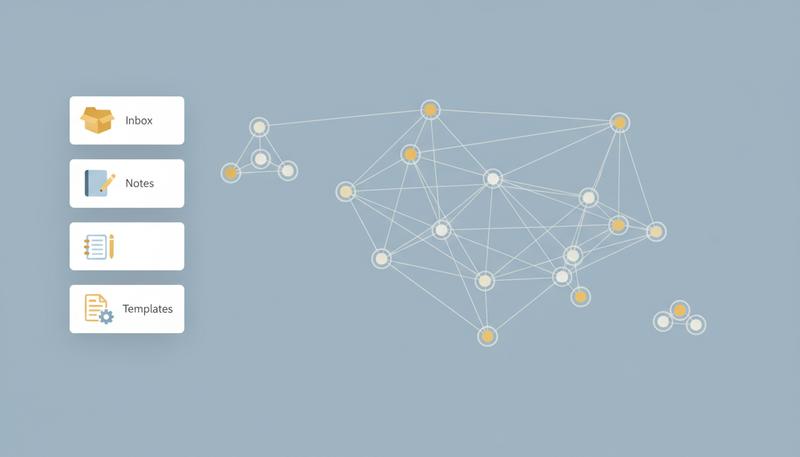
That's it. Three folders. Inbox is where things land when you're not ready to process them. Notes is where your permanent notes live — in one flat pool, not subdivided by topic. Templates holds your note templates. You can add a References/ folder if you want to separate literature notes from permanent notes, but honestly, you almost certainly don't need anything else until you have hundreds of notes and a clear, specific reason to reorganize.
The Core Mechanic: Wikilinks and Backlinks
If you learn one thing from this section, it's this: the double bracket is where the thinking happens.
In Obsidian, you create a link by typing [[note title]]. When you type the opening brackets, Obsidian pops up a search window showing your existing notes. You can select an existing note, or you can type a new title — in which case Obsidian creates the link immediately, and you can click through to create the note later. This is intentional design: it means the act of deciding to link happens before the linked note exists, which prevents you from breaking your train of thought.
What happens when you create a link? Two things:
- The forward link: clicking
[[note title]]in your current note takes you to that note. - The backlink: the linked note now shows, in its backlinks panel, that your current note references it. This happens automatically. You didn't have to do anything on the receiving end.
graph LR
    A[Note A: Memory Consolidation] -->|links to| B[Note B: Sleep and Learning]
    C[Note C: Spaced Repetition] -->|links to| B
    D[Note D: Retrieval Practice] -->|links to| B
    B -->|backlinks panel shows| E[A, C, D all reference this note]
This is more significant than it sounds. In a traditional hierarchical system, every note has exactly one location (its folder) and you find it by navigating to that location. In a linked system, a note's context is defined by every note that links to it. Note B above, "Sleep and Learning," gets richer and more meaningful as more notes reference it. It accumulates context without anyone explicitly managing that context. This is how the Zettelkasten builds emergent structure through links rather than imposing structure through folders.
A few practical habits for linking:
Link while writing, not after. When you write a permanent note and you think of another note it connects to, link immediately. Don't make a note to go back and add links later. You won't, and even if you do, the connection was forged at the moment you recognized it.
Create links to notes that don't exist yet. This is a feature, not a bug. Writing [[the role of sleep in memory consolidation]] before that note exists creates a placeholder that reminds you there's thinking to do there. Your vault becomes a map of your intellectual debts.
Use the pipe character for display text. [[actual note title|what appears in text]] lets you write natural prose while linking to precisely named notes. This keeps your notes readable as writing while preserving exact connections.
Note Naming: Why Your Titles Are More Important Than Your Filing
In a folder-based system, the filename doesn't matter much — you navigate to the folder and scan visually. In a link-based system, the note title is the primary interface. When you type [[, you're searching by title. When someone reads your note and sees a link, they're reading the title. When you look at your graph view, titles are what differentiate the nodes.
This means naming deserves genuine attention.
The principle: titles should be claims or concepts, not topics. "Memory" is a topic. "Sleep deprivation degrades memory consolidation within 24 hours" is a claim. A topic is a filing label. A claim is a thought you can agree with, push back on, or connect to other claims. Claims are atomic ideas — the currency of the Zettelkasten.
Some naming patterns that work well:
| Pattern | Example | When to use |
|---|---|---|
| Full sentence claim | "Spaced repetition outperforms massed practice for long-term retention" | Permanent notes expressing one idea |
| Question | "What makes certain metaphors stick?" | Notes exploring an open question |
| Concept label | "Elaborative interrogation" | Notes that define and explain a concept |
| Author + claim | "Kahneman on cognitive ease" | Literature notes |
What to avoid: generic titles like "Notes on X," "Thoughts about Y," or date-based titles for permanent notes. These are organizational labels dressed as titles. They tell you nothing about the content of the note and make search nearly useless.
Tip: When you're struggling to name a note, that's often a signal the note isn't atomic enough yet. If you can't express what it says in a single sentence or concept, it might contain multiple ideas that should be separate notes.
The Graph View: Beautiful, Useful, and Dangerous
The graph view is the feature that makes people fall in love with Obsidian on first sight. You open it, and there's this gorgeous constellation of nodes and connections representing your entire knowledge base. It's legitimately beautiful.
It's also almost entirely useless for actual thinking until you have a few hundred notes, and it's actively harmful if it becomes what you're optimizing for.
Let me explain what the graph view actually shows: every note in your vault as a dot, with lines between dots that have links between them. More-linked notes appear as larger dots. You can filter by tags, folders, or link depth.
What it's good for:
- Spotting orphaned notes (isolated dots with no connections) — these are notes you haven't done the thinking-work of connecting yet
- Getting a gestalt sense of which areas of your knowledge are densely developed vs. sparse
- Occasional navigation when you remember "there was a cluster of notes about X"
What it doesn't tell you:
- Whether your links are meaningful or superficial
- Which ideas are actually important
- Whether your Zettelkasten is working
Here's the trap: people start adding links specifically to make the graph look more connected and impressive. This is the Zettelkasten equivalent of cleaning your desk instead of doing the work. The zettelkasten.de overview makes the principle explicit: "Set links between notes. Full-text search on its own provides not enough information. Connections will do, especially in the long run." Links matter because they encode relationships between ideas, not because they produce a pretty visual.
Use the graph view for weekly orientation, not daily navigation. Navigate primarily through search (Ctrl/Cmd + O), backlinks, and following links in your notes.
Essential Plugins: Start Small, Add Deliberately
Obsidian has over a thousand community plugins. This is a blessing and a curse. For a Zettelkasten workflow, you need very few of them. Here's the minimum viable plugin set:
Core plugins to enable (these ship with Obsidian, just need turning on):
- Backlinks: shows which notes link to the current note. Essential — turn this on immediately.
- Templates: basic template insertion. Enables consistent note structure.
- Daily Notes: creates a new note for each day. Useful as a fleeting note inbox (more on this below).
- Search: full-text search across your vault. You'll use this constantly.
- Graph view: discussed above — turn it on, use it occasionally.
Community plugins worth adding (installed via Settings → Community plugins):
Templater (by SilentVoid): a significantly more powerful templating engine than the built-in one. It can auto-fill dates, prompt you for input, run JavaScript logic. Once you have templates for your three note types, Templater makes creating new notes from those templates quick and consistent. This is the one community plugin I'd genuinely call essential.
Dataview (by Michael Breaux): lets you query your vault like a database. You can ask questions like "show me all literature notes I created this week" or "list all permanent notes tagged #concept that have fewer than 3 links." This becomes more valuable as your vault grows — it's not urgent in the first month.
Warning: Dataview is genuinely powerful and genuinely a rabbit hole. Don't install it until you need a specific query you can't do with search. Many people install it immediately and spend hours building dashboards instead of building knowledge.
What you don't need:
- Fancy themes and visual customizations (they're fun, they don't help you think)
- Any AI writing assistant plugin in the early stages (let your own thoughts develop first)
- Task management plugins (that's a separate workflow)
- Mind-mapping plugins (you have the graph view)
graph TD
    A[Day 1 Setup] --> B[Core Plugins Only]
    B --> C[Backlinks + Templates + Daily Notes + Search]
    A --> D[Add Templater from Community]
    E[After 50 notes] --> F[Consider Dataview]
    F --> G[For specific query needs]
    H[Never] --> I[Plugins that add complexity without solving a problem you have]
Setting Up Templates for Your Three Note Types
One of the best investments of your first hour in Obsidian is building templates for fleeting notes, literature notes, and permanent notes. A template ensures you capture the right metadata every time, and it creates just enough friction-reduction that you'll actually use it.
Create a Templates/ folder and add these three files:
Fleeting Note Template (fleeting-note.md):
---
type: fleeting
date: {{date}}
---

# {{title}}

[Raw thought, question, or observation here]

**To process by:** {{date+3d}}
Keep it minimal. Fleeting notes are meant to be temporary — they're thoughts you've caught before they escaped. The "to process by" date is a gentle reminder that fleeting notes should graduate to permanent notes or be discarded, not accumulate indefinitely.
Literature Note Template (literature-note.md):
---
type: literature
date: {{date}}
author:
title:
source-url:
tags: []
---

# Literature: {{title}}

**Source:** [Author, Title, Year]


## Key ideas in my own words


## Quotes worth keeping (with page numbers)


## My questions and reactions


## Links to permanent notes
[[]]
The instruction that matters most here is "in my own words." The template enforces the habit of interpretation rather than transcription.
Permanent Note Template (permanent-note.md):
---
type: permanent
date: {{date}}
tags: []
---

# [Claim in one sentence]

[Development of the claim — typically 3-7 sentences, one focused idea]


## Why this matters


## Evidence/sources


## Connected notes
- [[]]
- [[]]


## Questions this raises
The "Connected notes" section is critical. Every permanent note should link to at least one other note before you close it. If you can't find a connection, that's not the note's fault — it's a signal to keep thinking.
The Daily Note as Fleeting Note Inbox
Obsidian's Daily Notes plugin creates a new note named with today's date every time you click the calendar icon. This is useful as a capture inbox, but it has a failure mode worth naming.
The failure mode: the daily note becomes a journal. You start writing about your day, your feelings, your plans. None of this is bad in itself, but it means the daily note stops functioning as a processing inbox and starts functioning as a diary — and diaries are extremely hard to extract knowledge from.
The distinction worth keeping: a fleeting note inbox captures ideas (thoughts, questions, things you read, connections you noticed), not events (what you did, how you felt, what happened). Events belong in a journal if you want to keep one; they just belong in a separate journal.
One pattern that works well: use the daily note for genuine capture throughout the day, but schedule a 15-minute "processing session" each evening or the next morning. During that session, you look at yesterday's daily note, decide what to keep, and either create permanent notes from the good stuff or delete the rest. The daily note itself becomes empty — or nearly so — after processing. This is psychologically important: if your daily notes accumulate unprocessed, you start to feel like you're behind, which creates anxiety that makes the system feel like a burden.
Remember: The daily note is a transit zone, not a destination. Ideas should pass through it on their way to permanent notes or the trash — not settle there permanently.
Common Setup Mistakes (And How to Avoid Them)
Let me spare you the month of iteration it takes to discover these on your own.
Mistake 1: Building the system before using the system. Creating elaborate folder taxonomies, tag hierarchies, and custom CSS before you have any meaningful content is the PKM equivalent of alphabetizing your bookshelf before buying books. The structure that serves you at 500 notes is different from the structure that serves you at 50, and you can't know which you'll need until you're there.
Mistake 2: Treating Obsidian like a filing cabinet for web clippings. The Web Clipper browser extension makes it trivially easy to save articles to your vault. This is the Collector's Fallacy in software form — zettelkasten.de names this directly: "you have to work with new material to really learn it. It doesn't suffice to bookmark websites or just read and annotate books." A vault full of saved articles is just a more complicated browser bookmarks folder. Only notes that represent your processed thinking belong in the permanent note archive.
Mistake 3: Over-tagging. Tags in Obsidian are easy to create and easy to overuse. If every note has fifteen tags, tags are functionally useless — they add no navigational value because they don't narrow anything down. Use tags sparingly and for things you'll genuinely filter by: note type, project, status, broad domain. Let links do the heavy lifting of expressing relationships.
Mistake 4: Renaming notes constantly. Because note titles matter, people obsessively rename them as their understanding evolves. A little of this is healthy — it's a sign your thinking is developing. But if you're spending more than five minutes a week on renaming, you've flipped from improving the system to fussing with it.
Mistake 5: Waiting for the perfect setup before writing real notes. I've seen people spend three weeks watching YouTube videos about Obsidian setups, building templates, and configuring plugins before writing a single permanent note. There is no perfect setup. The setup that works is the one that has notes in it.
The Minimum Viable Zettelkasten: What You Actually Need on Day One
After everything above, here's what you actually need to start on day one:
- Obsidian installed — free download, five minutes
- One vault — a folder called "Zettelkasten" or "Notes" or your name, wherever you want to store files
- Three subfolders — Inbox, Notes, Templates
- Three templates — fleeting, literature, permanent (ten minutes to set up)
- Core plugins enabled — Backlinks, Templates, Daily Notes, Search
- Templater installed — from Community plugins
That's it. That's the whole thing. You could be writing your first permanent note in thirty minutes from now.
Everything else — Dataview, fancy themes, elaborate tag taxonomies, custom CSS, automated workflows — can be added if and when you encounter a specific problem it solves. The question to ask before adding any complexity is: "what specific thing am I trying to do that I can't currently do?" If you don't have a crisp answer, don't add the complexity.
The Zettelkasten's power doesn't come from the tool's sophistication. It comes from the practice of writing atomic, linked, processed thoughts over time — consistently, for months and years. The zettelkasten.de overview puts it plainly: "What should my first note be? It doesn't matter. Just get started."
This is genuinely good advice. The note you write today is not important. The practice you build today is everything. Obsidian will get you out of your own way and let you focus on the thing that actually matters: the quality of your thinking, expressed one note at a time.
Only visible to you
Sign in to take notes.